
รายละเอียด
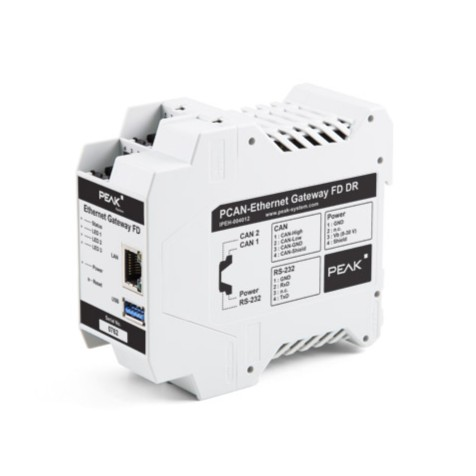
PEAK System: PCAN-Ethernet Gateway FD DR CAN FD to LAN Gateway in DIN Rail Plastic Casing
รหัสสินค้า IPEH-004012
รายละเอียดเกี่ยวกับสินค้า
PCAN-Ethernet Gateway FD DR ช่วยให้สามารถเข้าถึงบัส CAN แบบคลาสสิกหรือ CAN FD สมัยใหม่ผ่านเครือข่าย IP ยิ่งไปกว่านั้น CAN บัสยังสามารถเชื่อมต่อระหว่างกันผ่าน IP โดยใช้อุปกรณ์หลายเครื่อง เฟรม CAN รวมอยู่ในแพ็กเก็ตข้อความ TCP หรือ UDP จากนั้นส่งต่อผ่านเครือข่าย IP จากอุปกรณ์หนึ่งไปยังอีกอุปกรณ์หนึ่ง PCAN-Ethernet Gateway FD DR มีอินเทอร์เฟซ LAN และอินเทอร์เฟซ CAN FD สองอินเทอร์เฟซที่สามารถรองรับอัตราบิตได้สูงสุด 10 Mbit/s ด้วยโปรเซสเซอร์ AM5716 Sitara
ตระกูลผลิตภัณฑ์ PCAN-Gateway ได้รับการกำหนดค่าผ่านเว็บอินเตอร์เฟสที่สะดวกสบาย นอกจากนี้ยังรองรับอินเทอร์เฟซ JSON ผ่านซอฟต์แวร์ ตัวเลือกทั้งสองให้ข้อมูลสถานะ และการตั้งค่าของอุปกรณ์ อินเทอร์เฟซการสื่อสารต่างๆ การส่งต่อข้อความ และ Filter อีกด้วย
มาตรฐาน CAN FD (CAN ที่มีอัตราข้อมูลที่ยืดหยุ่น) มีลักษณะเด่นหลักคือแบนด์วิธที่สูงกว่าสำหรับการถ่ายโอนข้อมูล สูงสุด 64 ไบต์ข้อมูลต่อเฟรม CAN FD (จากเดิม 8 ไบต์จนถึงปัจจุบัน) สามารถส่งด้วยอัตราบิตสูงสุด 10 Mbit/s CAN FD เข้ากันได้กับมาตรฐาน CAN 2.0 A/B ดังนั้นโหนด CAN FD จึงสามารถใช้ในเครือข่าย CAN ที่มีอยู่ได้ ตัวอุปกรณ์นี้จะไม่รองรับ CAN FD Extensions
 Download PCAN Ethernet Gateway FD DR Datasheet
คุณสมบัติสินค้า
- Two High-speed CAN channels (ISO 11898-2)
- Comply with CAN specifications 2.0 A/B and FD
- CAN FD bit rates for the data field (64 bytes max.) from 20 kbit/s up to 10 Mbit/s
- CAN bit rates from 20 kbit/s up to 1 Mbit/s
- Microchip MCP2558FD CAN transceiver
- Galvanic isolation of the CAN channels up to 500 V against each other, against RS-232, and the power supply
- Connections for CAN, RS-232, and power supply via 4-pole screw-terminal strips (Phoenix)
- LAN interface
- Data transmission using TCP or UDP
- 10/100/1000 Mbit/s bit rate
- RJ-45 connector with status LEDs
- Monitoring and configuration of the devices via the web interface or JSON interface
- Software update via the web interface
- Reboot or reset of the device to a previous software version with a reset button
- Plastic casing (width: 45.2 mm) for mounting on a DIN rail (DIN EN 60715 TH35)
- LEDs for device status and power supply
- PCI Express Mini slot, USB port, and a RS-232 connector for future use
- Voltage supply from 8 to 30 V
- Operating temperature range from -40 to +70 °C (-40 to +158 °F)
- Fan for active cooling when a temperature limit is exceeded
การตั้งค่ารูปแบบต่างๆ
ด้วย PCAN-Gateways CAN บัสจึงสามารถเชื่อมต่อผ่าน LAN หรือ WLAN เฟรม CAN รวมอยู่ในแพ็กเก็ตข้อความ TCP หรือ UDP แล้วส่งต่อจากอุปกรณ์หนึ่งไปยังอีกอุปกรณ์หนึ่ง ด้วยเทคโนโลยีนี้ ทำให้สามารถเชื่อมต่อเครือข่าย CAN ในระยะไกลได้
การกำหนดค่ากลุ่มผลิตภัณฑ์ PCAN-Gateway ทำได้ผ่านเว็บอินเทอร์เฟซที่สะดวกสบาย ในการดำเนินการนี้ อุปกรณ์จะต้องเชื่อมต่อกับพีซีผ่าน LAN หรือ WLAN ขึ้นอยู่กับรุ่นที่ใช้ เว็บอินเตอร์เฟสสามารถเปิดได้ด้วยเบราว์เซอร์ทั่วไป หลังจากเข้าสู่ระบบสำเร็จ คุณจะสามารถเข้าถึงข้อมูลทั้งหมดและการกำหนดค่าการตั้งค่าอุปกรณ์ อินเทอร์เฟซการสื่อสาร การส่งต่อข้อความ และ Filter
นอกจากนี้ยังรองรับอินเทอร์เฟซ JSON ซึ่งช่วยให้การพัฒนาซอฟต์แวร์สามารถตรวจสอบ และกำหนดค่าอุปกรณ์ทั้งหมดที่เชื่อมต่อกับเครือข่าย IP ได้โดยอัตโนมัติ
ฟังก์ชันของ Web Interface
- Clear presentation of information about device settings, communication interfaces, message forwarding, and filters
- Definition of the public visibility of status information
- Import and export of device configurations
- Reset of the device configuration to factory defaults
- Comfortable software updates
- Scan of the IP network for further available PCAN-Gateways for an easier establishment of routes
- Layout automatically adjusts for mobile devices
- Rebooting the device via the website
- Enabling, disabling, and configuration of the JSON interface
- Integrated help pages
การกำหนดค่าช่องสัญญาณ CAN
- Selection of bit rates up to 1 Mbit/s from a preset list
- Setup of user defined bit rates via register values
- Status switching of the listen-only mode
การกำหนดค่า LAN Interface
- Automatic or manual setup of the device‘s IP address (IPv4) and the subnet mask
การกำหนดค่า WLAN Interface
- Set the WLAN operating mode to Infrastructure (Client), Ad-Hoc, or Access Point
- Automatic or manual setup of the device‘s IP address (IPv4) and the subnet mask
- Connection to the wireless network
- Configuration of the network encryption
การตั้งค่าและจัดการการส่งผ่าน Message
- Setup of the message forwarding between a CAN channel and LAN/WLAN (or vice versa)
- Selection of the participating CAN channel
- Definition of the LAN/WLAN station according to the IP address and the port
- Selection of the transfer protocol TCP or UDP
- Enabling, disabling, and editing of existing routes
- Disabling the PCAN-Gateway Handshake to allow the connection to other devices
คุณสมบัติการกรอง Message
- Creating and managing filters via a new section of the web interface
- Creating Filters with different options:
- Filtering messages with 11-bit or 29-bit IDs
- Support of range and mask filters
- Optional inversion of the filter range
- Assigning a filter to multiple routes
ฟังก์ชันของ JSON Interface
- Receiving of a request as a JSON-formatted GET parameter of an HTTP request
- Returning of the response in JSON format
- Reading out authorized information about device settings, communication interfaces, message forwarding, and filters
- Configuration of settings as well as adding and deleting message forwarding and filters (function is deactivated at delivery)
- Alternative access to the JSON interface via an emulated shell view with integrated documentation for an easy start
ตัวสินค้าประกอบด้วย
- PCAN-Ethernet Gateway FD DR in DIN rail plastic casing
- Mating connectors for both CAN channels, RS-232, and power supply (Phoenix Contact MSTB 2,5/4-ST BK – 1756298)
- RJ-45 network patch cord (2 m)
- คู่มือการใช้งานในรูปแบบ PDF
*ราคายังไม่รวมภาษีนำเข้า และภาษีมูลค่าเพิ่ม
มี ความ สนใจ ต้องการ ข้อมูล สเปก TOR เพิ่มเติม National Instruments NI Thailand ไทย ตัวแทน จำหน่าย คุณภาพ สูง ราคา ถูก ซื้อ ขาย ประเทศ ภาษา ไทย ซื้อ ที่ไหน ขาย ส่ง รับ นำเข้า งาน ประมูล
สามารถ กดปุ่ม หยิบใส่ตะกร้า ด้านบน เพื่อขอใบเสนอราคา หรือ
ติดต่อ ฝ่ายขาย บริษัท เทคสแควร์ จำกัด
โทร 065-559-6050
อีเมล sales@techsquare.co.th


